
What’s Up?
With an embarrassment of riches, morning photography here at ILE continues to be very good. There are seven baby cranes now ranging in size from medium sized two week old chicks to a single mid-sized colt at the north end. On Sunday, I did not see the Snail Kite that had taken up residence near the pier. The two young Bald Eagles can be found and photographed most days. The local Limpkin population seems to be increasing by leaps and bounds and some of the almost always present Cattle Egrets are approaching breeding plumage. Common Moorhen, Little Blue and Tricolored Heron, White Ibis, Boat-tailed Grackle, and Mottled Duck can be photographed well most mornings. And, I had a decent chance on a Common Snipe yesterday morning.
I will be heading down to the lake early today in part to see if the Snail Kite returns … Whatever you opt to do I hope that you too choose to have fun and enjoy life. Please remember that happiness is a choice — Byron Katie, The Work.Com After our morning session, I will continue to work hard on my slide program for PhotoCon KC (details below).
If you missed the Before and After YouTube video, you can check it out near the end of this post and see the amazing things that can be done with your images.
If an item — a Delkin flash card or reader, a Levered-clamp FlexShooter Pro, or a Wimberley lens plate or low foot — for example, that is available from B&H and/or Bedfords, is also available in the BAA Online Store, it would be great, and greatly appreciated, if you would opt to purchase from us. We will match or beat any price. Please remember also to use my B&H affiliate links or to earn 3% cash back at Bedford by using the BIRDSASART discount code at checkout for your major gear purchases. Doing either often earns you free guides and/or discounts. And always earns my great appreciation.
Gear Questions and Advice
Too many folks attending BAA IPTs and dozens of photographers whom I see in the field and on BirdPhotographer’s.Net, are — out of ignorance — using the wrong gear, especially when it comes to tripods and more especially, tripod heads. And the same is true in spades when ordering new camera bodies or lenses. My advice will often save you some serious money and may help you avoid making a seriously bad choice. Please know that I am always glad to answer your gear questions via e-mail.. If you are desperate, you can try me on my cell at 863-221-2372. Please leave a message and shoot me a text if I do not pick up.
|
|
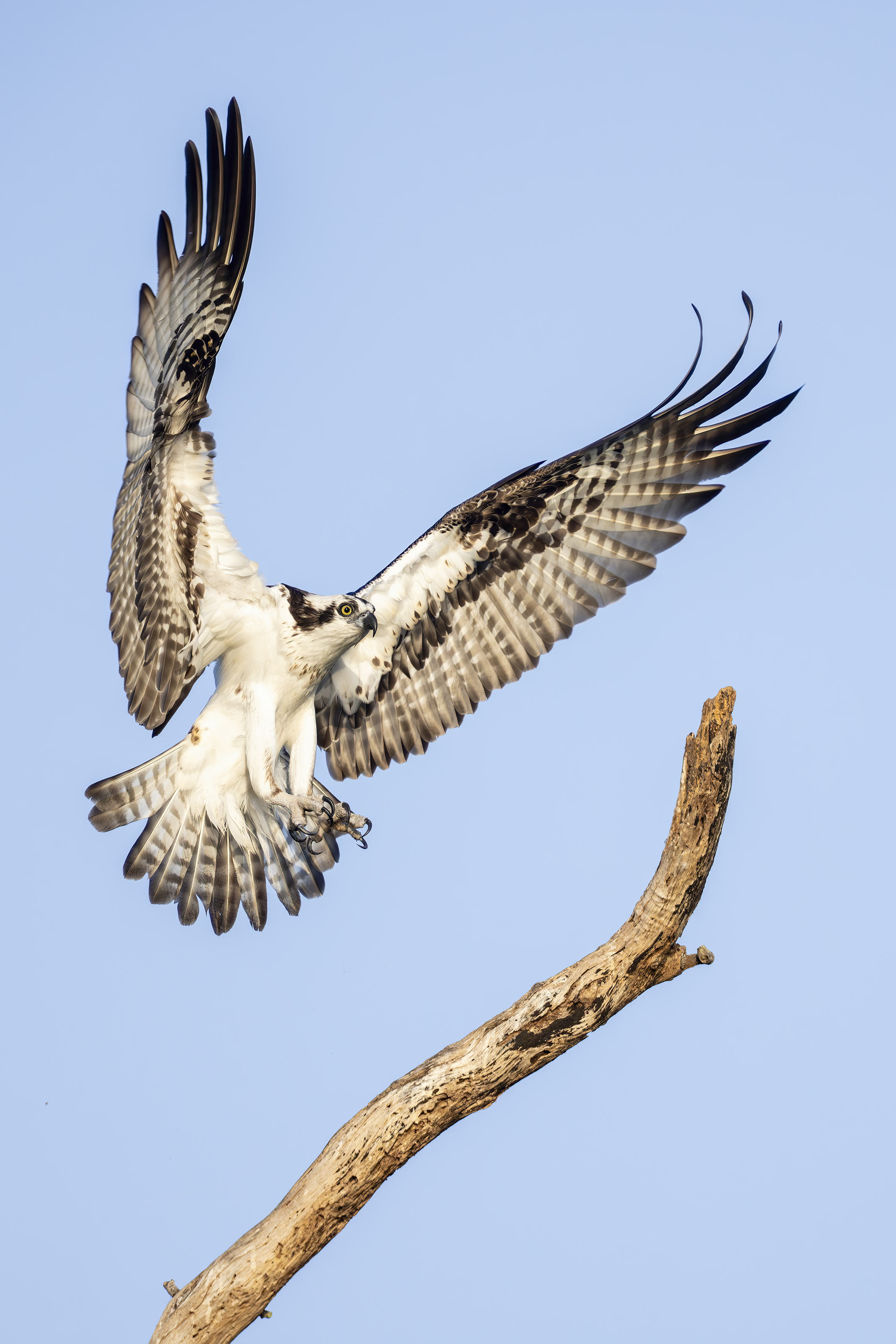
This image was also created on 1 April 2026 at Indian Lake Estates, FL. Still standing on the grass alongside the North Canal, I used the handheld Sony FE 300mm f/2.8 GM OSS Lens (Sony E) with the Sony FE 2x Teleconverter and the Latest Greatest Sony Flagship Body, the a1 II Mirrorless Camera. Exposure determined via Zebras with ISO on the Thumb Wheel. ISO 2500: 1/3200 sec. at f/5.6 (wide open) in Manual mode. RawDigger showed that the exposure was dead solid perfect plus a tiny bit with 1339 OvExp pixels (out of 51,000,000). As all of the OvExp pixels were in the GREEN channel, they were easily recovered during the raw conversion in Adobe Camera Raw. AWB at 7:51:42 am on a sunny morning. Wide/AF-C with Bird Eye/Face Detection enabled performed perfectly. Click on the image to enjoy the larger, inexplicably sharper high-res version. Image #1: Osprey landing on tall perch above its natural nest |
In the Last Blog Post
In the No Fooling! All Six (5 flight +1) of These Images Were Made on April First With the Sony 600mm f/5.6 GM OSS Lens blog post here, this image and #4, the Osprey in attack mode with the outstretched talons, were the top picks.
|
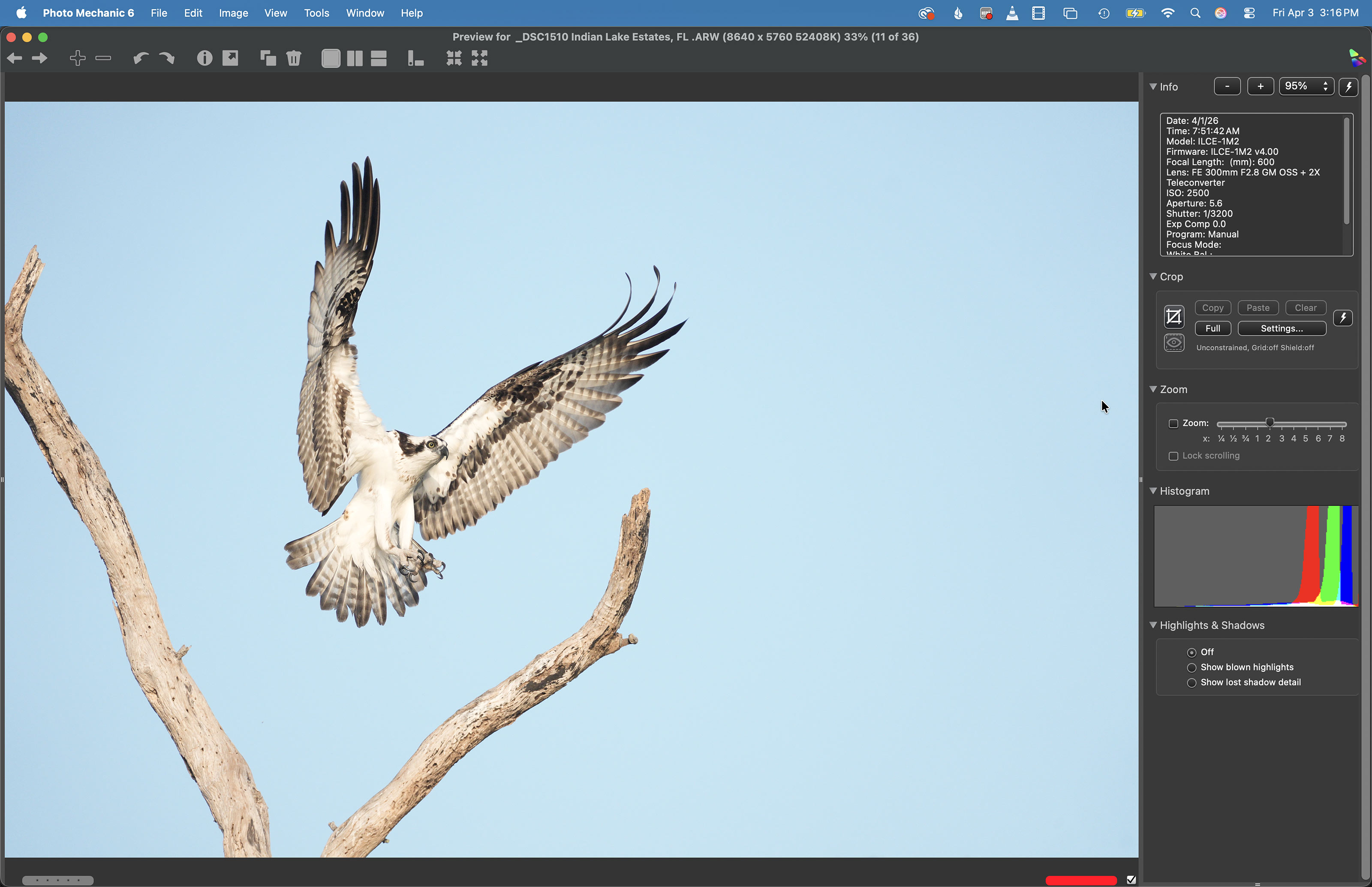
Image #1A: The Photo Mechanic screen capture for the Osprey landing on tall perch above its natural nest image |
Cropped From a Horizontal Original
This image, like most vertical flight shots, was cropped from a horizontal original. Folks loved the wing position, the evenly lit underwing detail, and the image design in which the diagonal perch was an important element. The Photo Mechanic histogram for this one is quite accurate; if you enlarge the image you can see a thin red line beginning to climb the right hand axis indicating a bit of over-exposure. Note the improved BLUE tones in the optimized version above. I used an ACR mask on the sky when working on the BLUEs, as detailed in the Digital Basics IV Video Series.
|
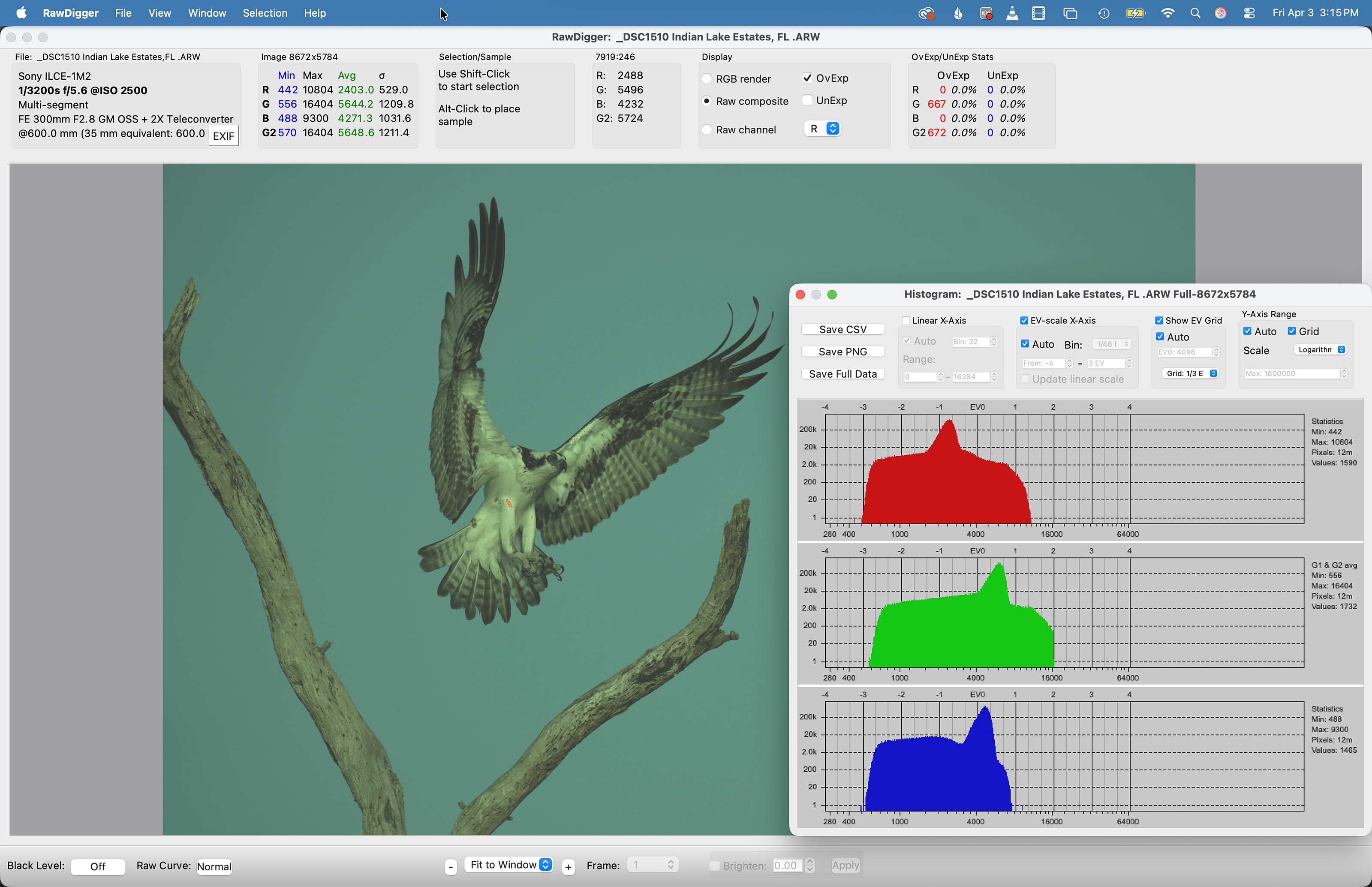
Image #1B: The RawDigger screen capture for the Osprey landing on tall perch above its natural nest image |
Raw Digger
Whatever system you are using, RawDigger can help you learn to expose to the right. Sony folks with their cameras set up properly and who use Zebra technology, however, have a huge advantage when it comes to creating perfect exposures. Bringing every raw file into RawDigger tells me whether I need to move the Exposure slider during a raw conversion in ACR in Photoshop or Lightroom. And the same would be true if I were using Capture One.
As RawDigger is so important to my worlflow, it makes zero sense to me that BAA has not sold a single RawDigger guide in more than two years. It’s as if folks “can’t handle the truth.”
From AI Overview
“You can’t handle the truth!” is a famous line from the 1992 film A Few Good Men, spoken by Jack Nicholson’s character, Colonel Nathan R. Jessep, to Tom Cruise’s Lieutenant Daniel Kaffee during a tense courtroom scene. It suggests that the speaker believes the listener is too fragile or naive to accept harsh, uncomfortable, or necessary realities.
|
|
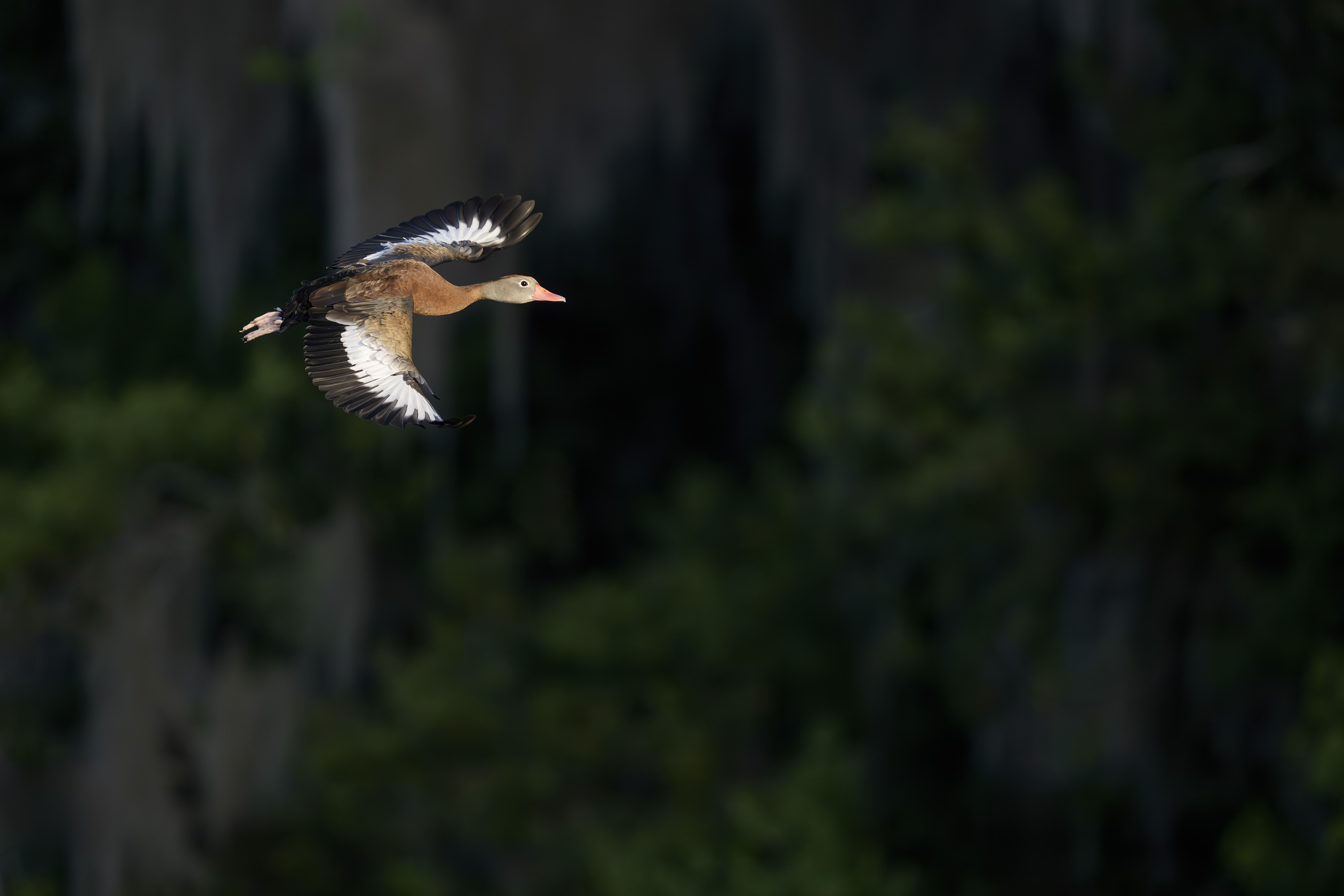
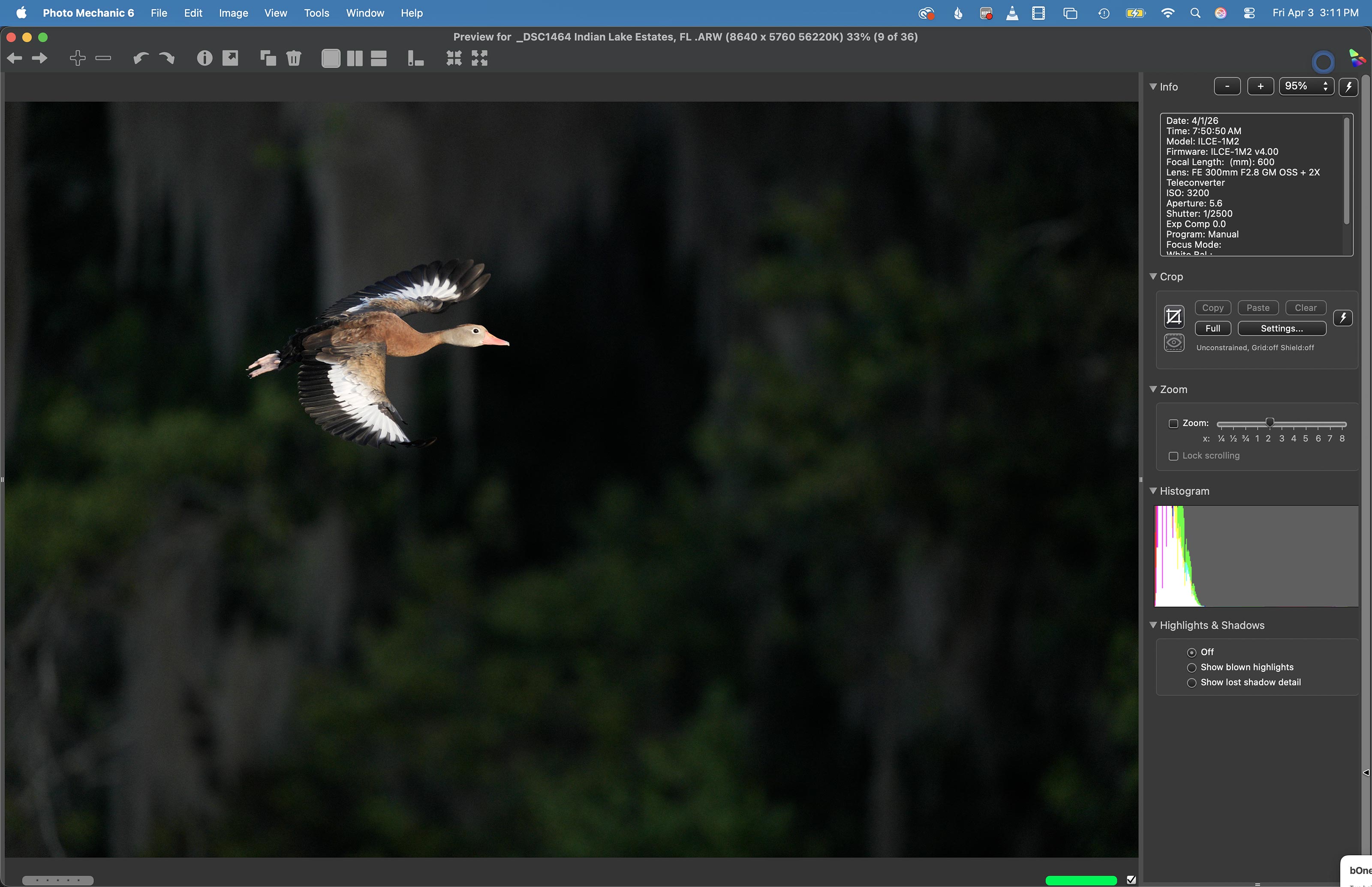
This image was also created on 1 April 2026 at Indian Lake Estates, FL. Standing on the grass alongside the North Canal near the natural Osprey nest, I used the handheld Sony FE 300mm f/2.8 GM OSS Lens (Sony E) with the Sony FE 2x Teleconverter and the Latest Greatest Sony Flagship Body, the a1 II Mirrorless Camera. Exposure determined via Zebras with ISO on the Thumb Wheel. ISO 3200: 1/2500 sec. at f/5.6 (wide open) in Manual mode. RawDigger showed that the exposure was dead solid perfect: AWB at 7:50:50am on a then sunny morning. Wide/AF-C with Bird Eye/Face Detection enabled performed perfectly. Click on the image to enjoy the larger, inexplicably sharper high-res version. Image #2: Black-bellied Whistling Duck in flight |
My Call
In the aforementioned blog post, I was alone in picking this photo as my favorite image. Why?
#1: I love the background.
#2: Getting the right exposure was a challenge with the sidelight and the nearly black background. I had set the exposure for the Purple Martins and grackles that were flying by. I got on the bird as it took flight and noted only a few Zebras on the white primary and secondary coverts so I did not try for a bit less light. Note that exposure changes when you work well off sun angle; there is less light. Thus, the exposure for the darker subjects was dead solid perfect for this frame.
#3: I reacted quickly when the bird flew away from me and then unexpectedly turned east and flew up the North Canal. That is normally not a strength of mine.
4- I love the background :-).
|
Image #2A: the Photo Mechanic screen capture for the Black-bellied Whistling Duck in flight image |
The Lying Histogram
Looking at the Photo Mechanic histogram (or the in-camera histogram as well), you would think that this image is three to four stops underexposed. If, however, you add any light to the exposure the white feathers would be over-exposed and the image un-savable.
|
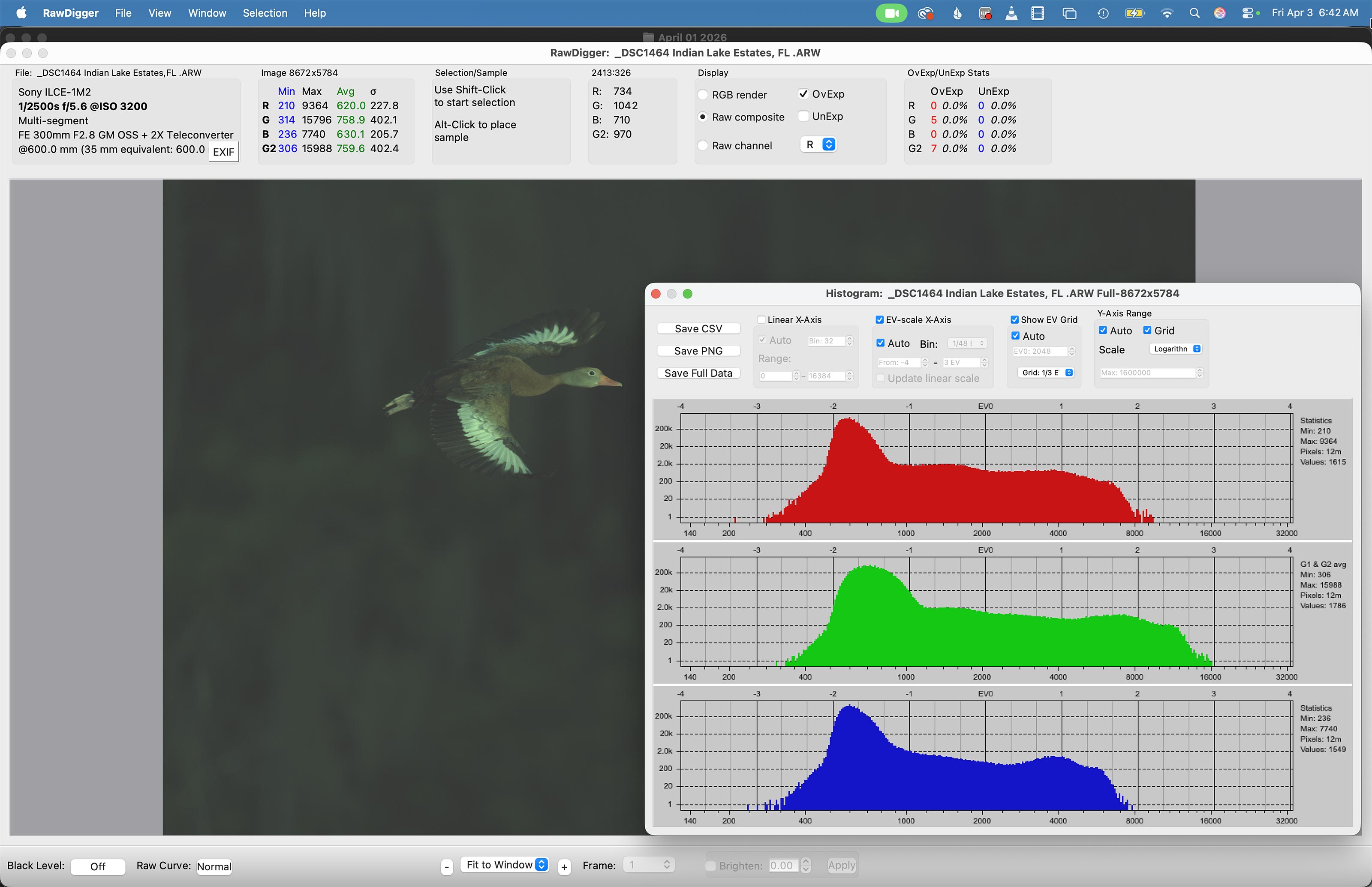
Image #2B: the RawDigger screen capture for the Back-bellied Whistling Duck in flight image |
The RawDigger Histogram
On the other hand, the RawDigger (adapted) histogram showed that the raw file exposure for the whistling duck image was actually dead solid perfect with the GREEN channel just about reaching the 16,000 axis on our right.
Ho Hum, Another Perfect Exposure
What can I say? The combination of Zebras live in the viewfinder (with your camera set up properly) and post-capture study of the raw files in RawDigger makes it pretty much child’s play to come up with perfect exposure after perfect exposure. It would be impossible to overstate how much I have learned by studying RawDigger and how much better my exposures have become since I started with the program about seven years ago. With the G channel coming right up to the 16,000 line, the raw file brightness for the image above is dead solid perfect.
RawDigger — not for the faint of heart …
Nothing has ever helped me learn to create perfect exposures to the degree that RawDigger has. I think that many folks are reluctant to learn that most of their images are underexposed by one or more full stops and that highlight warnings in Photoshop, Lightroom, Capture One, and your in-camera histogram are often bogus as they are based on the embedded JPEGs. Only your raw files tell the truth all the time. Heck, I resisted RawDigger for several years … Once you get over that feeling, RawDigger can become your very best exposure friend no matter what system you are using. On the recent IPTs and In-the-Field sessions, we have demonstrated that fact over and over again. Convincingly.
The RawDigger Adapted (pink) Histogram
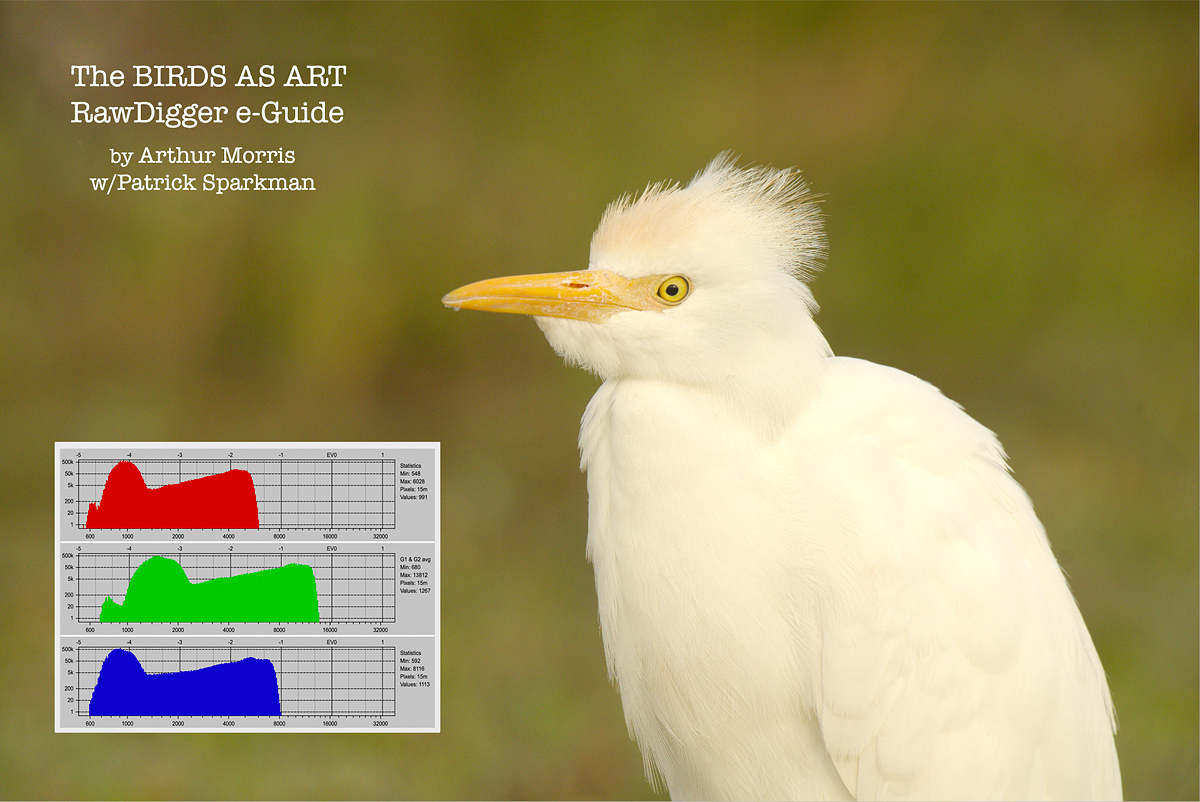
In the RawDigger e-Guide, you will learn exactly how to set up the Adapted “pink” RawDigger Histogram and how to use it to quickly and easily evaluate the exposure or raw file brightness of images from all digital cameras currently in use. RawDigger was especially helpful to me when I struggled with R5 exposures and learned my then new camera body, the Sony Alpha a1.
|
RawDigger e-Guide with Two Videos |
The RawDigger e-Guide with Two Videos
by Arthur Morris with Patrick Sparkman
The RawDigger e-Guide was created only for serious photographers who wish to get the absolute most out of their raw files.
Patrick and I began work on the guide in July 2020. At first, we struggled. We asked questions. We learned about Max-G values. We puzzled as to why the Max G values for different cameras were different. IPT veteran Bart Deamer asked lots of questions that we could not answer. We got help from RawDigger creator Iliah Borg. We learned. In December, Patrick came up with an Adapted Histogram that allows us to evaluate the exposures and raw file brightness for all images created with all digital camera bodies from the last two decades. What we learned each time prompted three complete beginning to end re-writes.
The point of the guide is to teach you to truly expose to the Expose-to-the-Right so that you will minimize noise, maximize image quality, best utilize your camera’s dynamic range, and attain the highest possible level of shadow detail in your RAW files in every situation. In addition, your properly exposed RAW files will contain more tonal information and feature the smoothest possible transitions between tones. And your optimized images will feature rich, accurate, natural color.
We teach you why the GREEN channel is almost always the first to over-expose. We save you money by advising you which version of RawDigger you need. We teach you how to interpret the Max G values for your Canon, Nikon, and SONY camera bodies. It is very likely that the Shock-your-World section will shock you. And lastly — thanks to the technical and practical brilliance of Patrick Sparkman — we teach you a simple way to evaluate your exposures and the raw file brightness quickly and easily the Adapted RawDigger histogram.
The flower video takes you through a session where artie edits a folder of images in Capture One while checking the exposures and Max-G values in RawDigger. The Adapted Histogram video examines a series of recent images with the pink histograms and covers lots of fine points including and especially how to deal with specular highlights. The directions for setting up the Adapted Histogram are in the text.
If we priced this guide based on how much effort we put into it, it would sell it for $999.00. But as this guide will be purchased only by a limited number of serious photographers, we have priced it at $51.00. You can order yours here in the BAA Online Store.
|
|
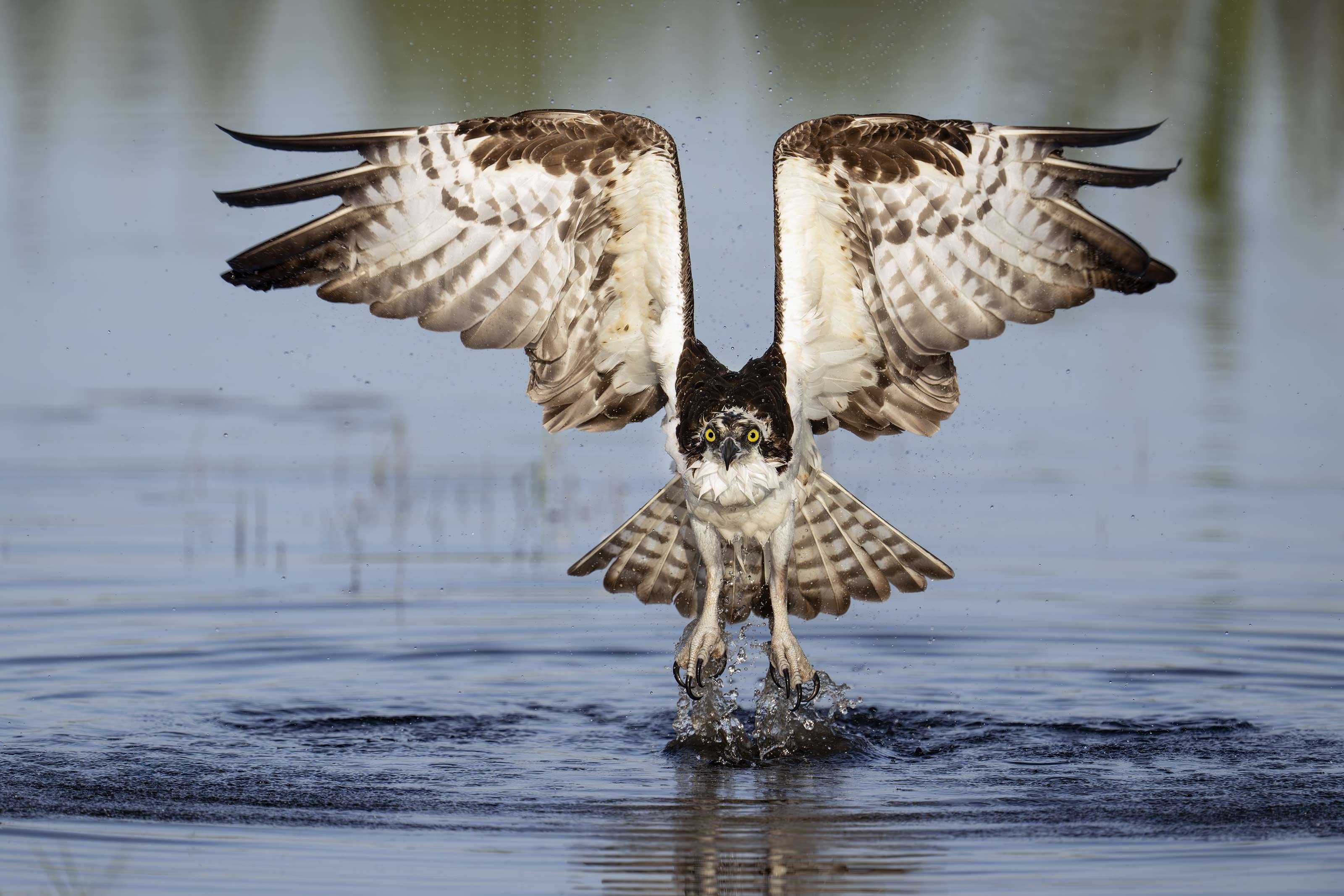
This image was created by yours truly on 5 April 2026 at Indian Lake Estates, FL. Seated in the front seat of my SUV I used the BLUBB-supported Sony FE 600mm f/4 GM OSS lens with the Sony FE 1.4x Teleconverter, and The Latest Greatest Sony Flagship Body, the a1 II Mirrorless Camera. The exposure was determined via Zebras with ISO on the rear dial. ISO 1000: 1/4000 sec. at f/5.6 (wide open). AWB at 8:00:50am on sunny morning. Wide AF-C with Bird-Eye/Face Detection performed perfectly. Click on the image to enjoy the larger, inexplicably sharper and warmer high-res version. Image #3: Osprey taking flight after bath |
Made My Morning
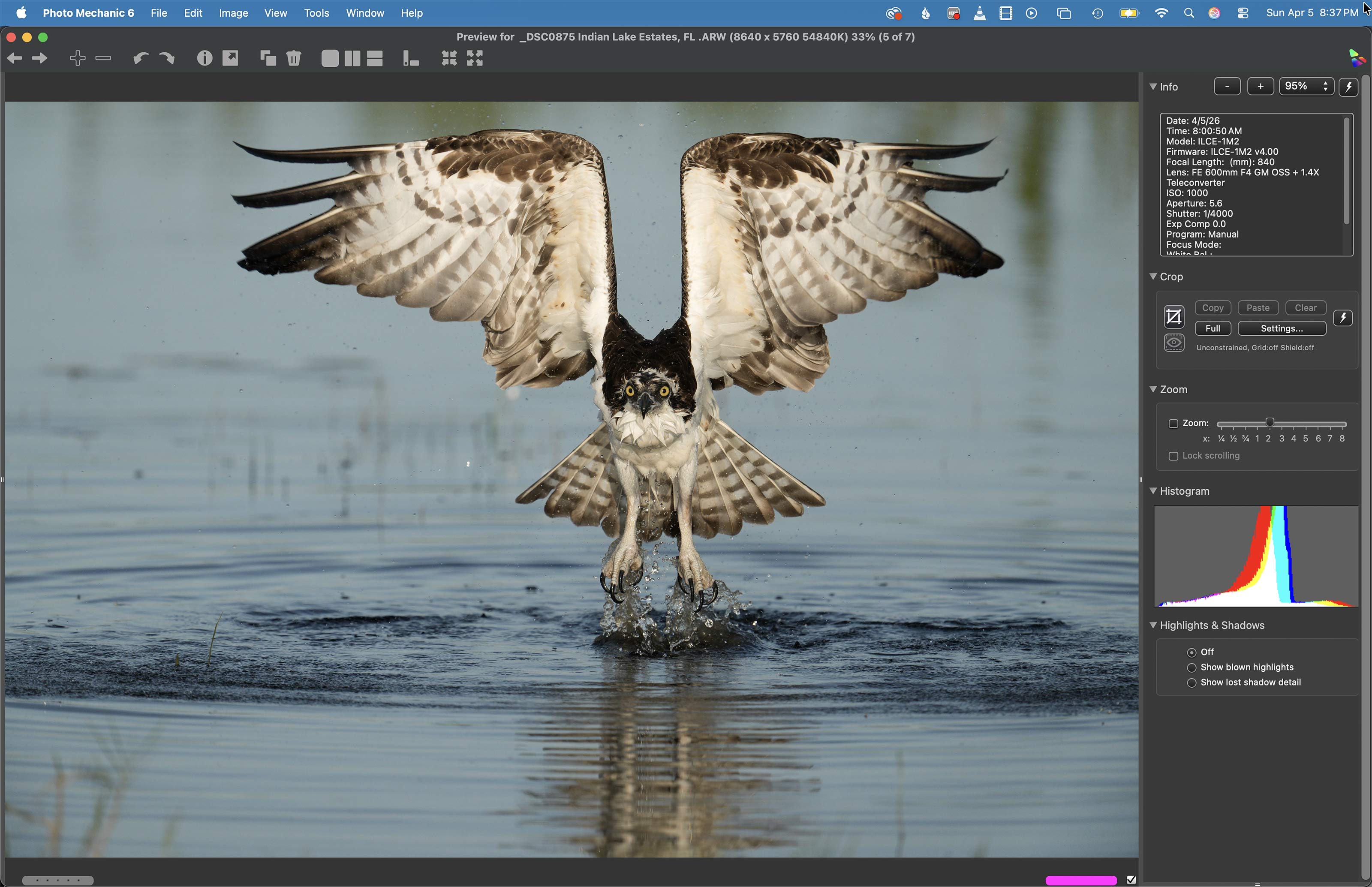
Sunday morning was the first time in a week where I did not see the Snail Kite by the pier or anywhere else. There was an Easter sunrise service at the pavilion. Bird photography was a bit on the slow side. Every morning I make my rounds looking for a good situation. I check the South Peninsula, the South Field, the area on both sides of the pier, and the North Field. If I come up empty, I do the whole thing again. On my third visit to the bay south of the pier I spotted an Osprey bathing. When the raptors bathe they can be quite skittish. Working at 840mm allowed me to stay well back. Despite a decent east wind, the bird was angled slightly away from me after I drove very slowly onto sun angle. Then it turned parallel to the back of my camera and splashed and flapped. Finally, it faced into the wind and then took flight right at me. Image #3 was my favorite from about 400 photos.
|
Image #3A: the Photo Mechanic screen capture for the Osprey taking flight after bath image |
The Photo Mechanic Screen Capture
Things to note:
1- The vastly improved BLUE tone in the optimized version immediately above.
2- The accurate histogram.
3- The crop from the bottom left while expanding canvas above using Content Aware Crop.
4- The minimal cleanup of some dark spots in the water.
|
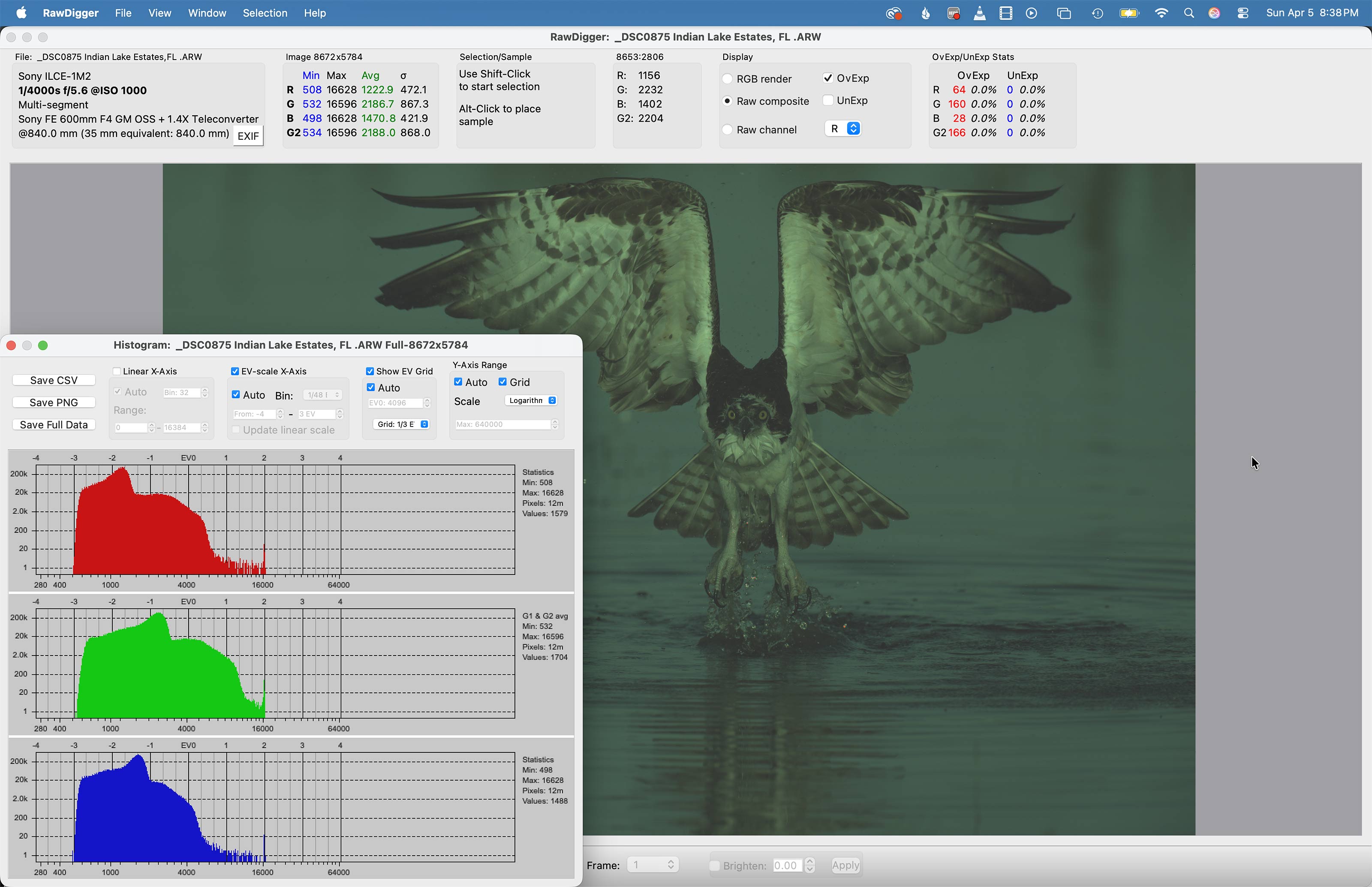
Image #2B: the RawDigger screen capture for the Osprey taking flight after bath image |
The 318 Over-Exposed Pixels
Click on the image to enlarge it and note the few red speckles (OvExp warnings) in the splashing water at the bird’s feet. They are the result of the specular highlights and comprise the 318 OvExp pixels. As these are reflections of the sun, the must be over-exposed. Out of 51 million pixels, their effect is nil.
Learning from Image #1
Though I was easily able to recover the over-exposed highlights in Image #1 — the Osprey image above, I generally strive to avoid them. I remember pushing the exposure for that one just a bit too far to the right by observing significant Zebras on the bird’s breast. So, four days later, when I had an Osprey bathing, I went for just a very few Zebra’s. The results were dead-solid perfect. Both images were made on clear sunny mornings.
Note: On cloudy days I always go for lots of Zebras on the highlights. On sunny days the best course of action is to go for just a few.
Artistry and Creativity in Image Optimization
The fact is that I enjoy working on my images and on the images of others as much as I do being in the field with the birds and creating the photographs. Now, please do not get me wring: junk in equals junk out (JIJO) and that will never change. However, there is virtually unlimited potential in nearly all sharp digital images that is waiting to be unlocked by those with an artistic eye and a reasonable level of Photoshop skills. Thus, I am able to turn a near-delete into something worthy of oohs and ahs. Then there is the matter of taking a properly exposed to the right, washed out, flat raw file and bringing it to life using the sliders in Adobe Camera Raw in both Photoshop and Lightroom.
While I excel at cleaning up distracting stuff in an image using a variety of tools and techniques, I almost always manage to preserve the natural history of the photo while creating an artistically pleasing version of the original. And when I don’t, if I move a bird around in the frame or add something to an image, for example, I let folks and editors know. The tools and techniques that I use include the Patch Tool, the amazing Remove Tool,Tool, Content Aware Fill, Content Aware Crop (to expand canvas), the Clone Stamp Tool (rarely), Quick Masks, Regular Layer Masks, Inverse (Black or Hide-all) Masks, and Divide and Conquer.
One of the great advantages of coming on a BIRDS AS ART Instructional Photo-Tour is that I optimize several of each students’ best images and create a screen capture video for each image optimization. Everyone goes home with all the videos. You can see what is possible by watching the almost 28-minute YouTube video above. You will see some wonderful images and some skillful post processing as well. With lots of tips along the way, of course. As always, the proof is in the pudding!
Note: the video cover image is courtesy of and copyright 2026: Robert Eastman

|
The BIRDS AS ART Digital Basics Collection: $199.00. |
The BIRDS AS ART Digital Basics Collection
The best news is that learning to use these tools and techniques to improve your images is made fairly simple for those who purchase, use and study the Digital Basics offerings from BIRDS AS ART. One of the great skills that I have been blessed with is writing coherent how-to instructions that can be followed easily by a third grader. Learn to unlock the potential in your images by purchasing the Digital Basics Collection here. The collection includes the Digital Basics II PDF, and all the videos in the Digital Basics III and the Digital Basics IV Video Series.
The original Digital Basics file was created in the mid-aughts when I saw countless numbers of folks creating sharp, nicely designed, well exposed images and then ruining them in Photoshop. I sold enough copies at $20.00 a pop to pay for my $68,000 lap pool. As my workflow changed and improved, various versions of Digital Basics were created to help folks learn to improve their images at the computer during post processing. Save an incredible $86.00 by purchasing the Digital Basics Collection here. Folks who own one or two of the three afore-mentioned products are invited to contact me via e-maill for personalized discount information.
Typos
With all blog posts, feel free to e-mail or to leave a comment regarding any typos or errors.









Leave a Reply