
Artistry and Creativity in Image Optimization
The fact is that I enjoy working on my images and on the images of others as much as I do being in the field with the birds and creating the photographs. Now, please do not get me wring: junk in equals junk out (JIJO) and that will never change. However, there is virtually unlimited potential in nearly all sharp digital images that is waiting to be unlocked by those with an artistic eye and a reasonable level of Photoshop skills. Thus, I am able to turn a near-delete into something worthy of oohs and ahs. Then there is the matter of taking a properly exposed to the right, washed out, flat raw file and bringing it to life using the sliders in Adobe Camera Raw in both Photoshop and Lightroom.
While I excel at cleaning up distracting stuff in an image using a variety of tools and techniques, I almost always manage to preserve the natural history of the photo while creating an artistically pleasing version of the original. And when I don’t, if I move a bird around in the frame or add something to an image, for example, I let folks and editors know. The tools and techniques that I use include the Patch Tool, the amazing Remove Tool,Tool, Content Aware Fill, Content Aware Crop (to expand canvas), the Clone Stamp Tool (rarely), Quick Masks, Regular Layer Masks, Inverse (Black or Hide-all) Masks, and Divide and Conquer.
One of the great advantages of coming on a BIRDS AS ART Instructional Photo-Tour is that I optimize several of each students’ best images and create a screen capture video for each image optimization. Everyone goes home with all the videos. You can see what is possible by watching the almost 28-minute YouTube video above. You will see some wonderful images and some skillful post processing as well. With lots of tips along the way, of course. As always, the proof is in the pudding!
Note: the video cover image is courtesy of and copyright 2026: Robert Eastman

|
The BIRDS AS ART Digital Basics Collection: $199.00. |
The BIRDS AS ART Digital Basics Collection
The best news is that learning to use these tools and techniques to improve your images is made fairly simple for those who purchase, use and study the Digital Basics offerings from BIRDS AS ART. One of the great skills that I have been blessed with is writing coherent how-to instructions that can be followed easily by a third grader. Learn to unlock the potential in your images by purchasing the Digital Basics Collection here. The collection includes the Digital Basics II PDF, and all the videos in the Digital Basics III and the Digital Basics IV Video Series.
The original Digital Basics file was created in the mid-aughts when I saw countless numbers of folks creating sharp, nicely designed, well exposed images and then ruining them in Photoshop. I sold enough copies at $20.00 a pop to pay for my $68,000 lap pool. As my workflow changed and improved, various versions of Digital Basics were created to help folks learn to improve their images at the computer during post processing. Save an incredible $86.00 by purchasing the Digital Basics Collection here. Folks who own one or two of the three afore-mentioned products are invited to contact me via e-maill for personalized discount information.
What’s Up?
With clear skies and a northwest wind in the forecast I opted to bring the second 2026 Stick Marsh group to Indian Lake Estates on Tuesday morning for the crane family with two week old chicks. Everyone was amazed at times as the two chicks they foraged with a foot of our feet! Better yet, everyone made some wonderful images. We did, however, strike out on the Barred Owl :-(. We headed to Sebastian Inlet for a short sunset session and had some nice color on the water until a huge cloud came out of nowhere to cover the sun. Then we worked the pelicans and Wood Storks hanging out by the fish cleaning station under the bridge using slow shutter speeds along with ridiculously high ISOs. Experimenting in extremely difficult low light situations can pay huge dividends later on …
Today Wednesday 25 March 2026. The forecast for Fellsmere called for brief showers at 7:00am followed by partly cloudy skies with a light breeze from the ENE. We headed for the spoonbills early and enjoyed a quite excellent morning with many dozens of spoonbills flying in in the soft light. We capped the morning with a Double-crested Cormorant twice grabbing large Atlantic Needlefish! The first one escaped, the second one went down the hatch. Photos soon! Whatever you opt to do I hope that you too choose to have fun and enjoy life. Please remember that happiness is a choice — Byron Katie, The Work.Com After our morning session, I will continue to work hard on my slide program for PhotoCon KC (details below).
If an item — a Delkin flash card or reader, a Levered-clamp FlexShooter Pro, or a Wimberley lens plate or low foot — for example, that is available from B&H and/or Bedfords, is also available in the BAA Online Store, it would be great, and greatly appreciated, if you would opt to purchase from us. We will match or beat any price. Please remember also to use my B&H affiliate links or to earn 3% cash back at Bedford by using the BIRDSASART discount code at checkout for your major gear purchases. Doing either often earns you free guides and/or discounts. And always earns my great appreciation.
Gear Questions and Advice
Too many folks attending BAA IPTs and dozens of photographers whom I see in the field and on BirdPhotographer’s.Net, are — out of ignorance — using the wrong gear, especially when it comes to tripods and more especially, tripod heads. And the same is true in spades when ordering new camera bodies or lenses. My advice will often save you some serious money and may help you avoid making a seriously bad choice. Please know that I am always glad to answer your gear questions via e-mail.. If you are desperate, you can try me on my cell at 863-221-2372. Please leave a message and shoot me a text if I do not pick up.
IPT Updates
I was thrilled to learn that multiple Homer IPT veteran Chris Loffredo will be joining the second 2027 San Diego IPT and that long-ago IPT veteran Jon Sostarich and multiple IPT veteran Mike De Rosa will be attending the first 2027 Homer IPT and both songbird days. See the complete details here.
San Diego IPT #1: 4 1/2 DAYS: WED 6 JAN thru the morning session on SUN 10 JAN 2027: $2699.00. Deposit: $699.00. Limit: 5 photographers.
San Diego IPT #2: 4 1/2 DAYS: TUES 19 JAN thru the morning session on SAT 23 JAN 2027: $2699.00. Limit: 5 photographers/Openings: 4.
Anchor Point Songbird Days: WED 10 FEB & TUES 11 FEB 2027. Full day: $500/day.
Homer IPT #1: FRI 12 FEB 2027 through the full day on TUES 16 FEB 2027. Five days/20 hours on the boat: $5900.00. Limit 5 photographers/Openings: 2
Homer IPT #2: WED 17 FEB 2027 through the full day on SUN 21 FEB 2027. Five days/20 hours on the boat: $5900.00. Limit 5 photographers/Openings: 2
Dates for the three 2027 Stick Marsh IPTs will be announced here soon.
|
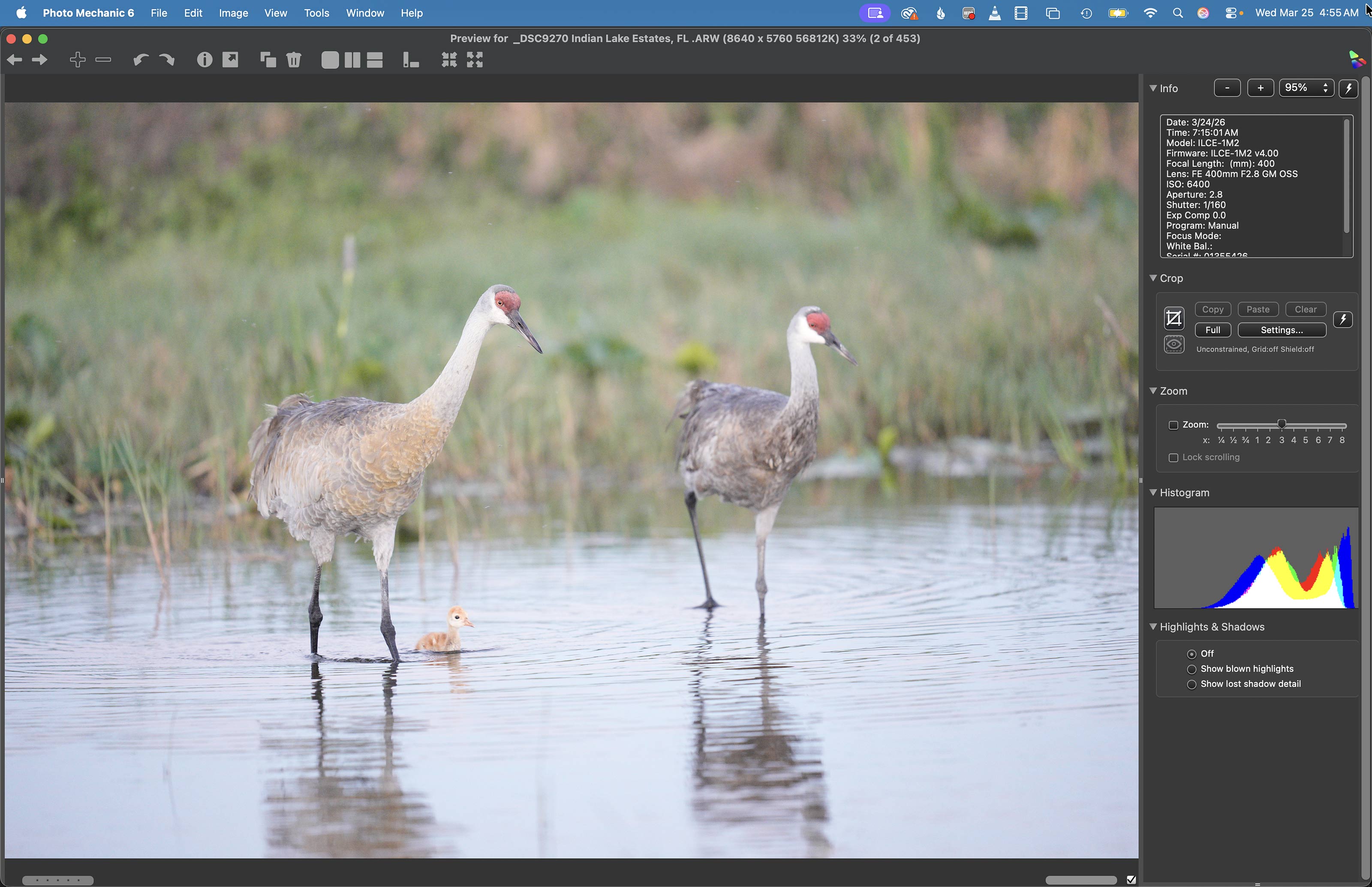
Image #1:Sandhill Crane with chick in tow — the Before |
The Before Image
This wide image was created as the male crane led the chick to shore. Curiously, the second chick did not follow and remained in the marsh until the adults circled back for it five minutes later. Note that the chick in the image was not rendered sharply because of insufficient depth of field. But, it was close enough to the plane of focus that I was able to work with the image. I envisioned a vertical crop.
Shutter Speed Choice
Working at 1/160 second with a 400mm lens and an albeit slowly moving subject was a bit on the risky side but I did not want to go above ISO 6400. Being seated and using the knee-pod technique was surely better than standing and handholding. Anyhoo, I got lucky as the adult is razor sharp on the eye.
|
|
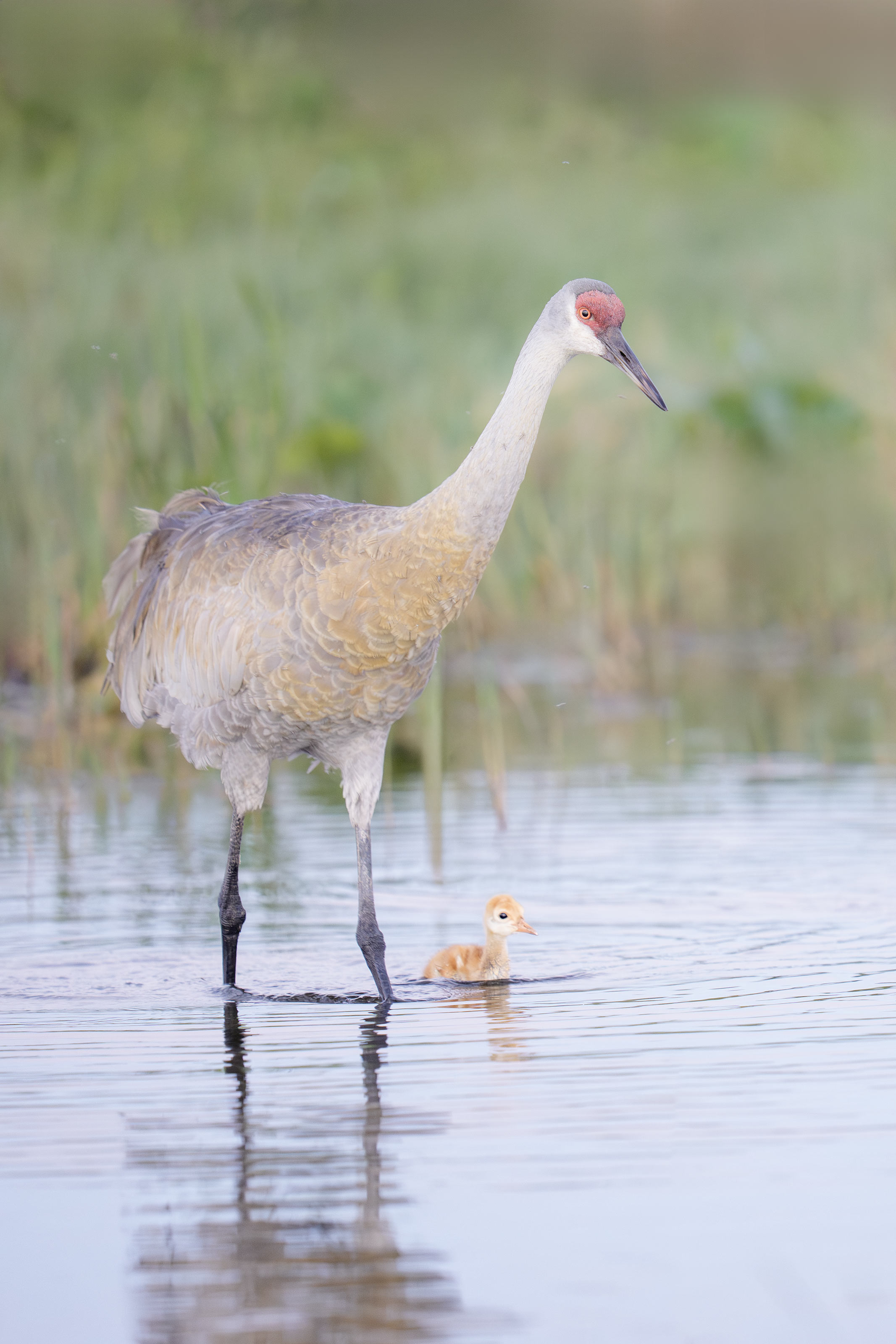
This image was created on 24 March 2026 at Indian Lake Esates, the first morning of the 2nd Stick Marsh IPT. Seatedd on damp sand I used the knee-pod technique with the handheld Sony FE 400mm f/2.8 GM OSS Lens and The Latest Greatest Sony Flagship Body, the a1 II Mirrorless Camera. The exposure was determined via Zebras with ISO on the thumb dial. ISO 6400: 1/160 sec. at f/2.8 (wide open) in Manual mode. RawDigger showed that the exposure was perfect. AWB at 7:15:01 ten minutes before sunrise. Wide/AF-C with Bird Eye/Face Detection enabled performed adequately. Click on the image to see a larger, sharper high resolution version Image #1A: Sandhill Crane with chick in tow — the After |
The After (Optimized) Image
As noted above, I saw a nice vertical here. After converting the image in Adobe Camera Raw, I did some background and other clean-up work with the Remove Tool, mostly on some distracting blades of grass and some distracting stalks. Then I brought the image back into ACR and created a mask by selecting the background and then used Subtract Object to eliminate the water from the mask. To soften (only) the masked area, I moved both the Clarity and the Dehaze sliders to the left to taste.
To give the chick a bit more punch I selected it using the Quick Selection Tool and went with a Contrast Mask at the max: 80/20/0. Learn about a Contrast Mask in the Digital Basics II PDF. All in all I was quite happy with the result.
Anyone Can Learn Photoshop!
As you will see in today’s YouTube Video, Photoshop can do amazing things. And the big news is that it is not difficult to learn to improve your images. Anybody can do it. Especially when you have clear, easy to follow instructions like those in the he BIRDS AS ART Digital Basics Collection.
|
The BIRDS AS ART Current Workflow e-Guide (Digital Basics II).You can order your copy from the BAA Online Store here, by sending a PayPal for $40 here, or by calling Jim or Jennifer weekdays at 863-692-0906 with your credit card in hand. Be sure to specify Digital Basics II. |
The BIRDS AS ART Current Workflow e-Guide (Digital Basics II)
The techniques mentioned above and tons more great Photoshop tips and techniques — along with my complete digital workflow, Digital Eye Doctor Techniques, and all my personalized Keyboard Shortcuts — are covered in detail in the BIRDS AS ART Current Workflow e-Guide (Digital Basics II), an instructional PDF that is sent via e-mail. Note: folks working on a PC and/or those who do not want to miss anything Photoshop may wish to purchase the original Digital Basics along with DB II while saving $15 by clicking here to buy the DB Bundle.
Please note: the Divide and Conquer technique was inadvertently omitted from DB II. It is detailed in a free excerpt in the blog post here.
Folks who learn well by following along rather than by reading can check out the complete collection of MP 4 Photoshop Tutorial Videos by clicking here. Note: most of the videos are now priced at an amazingly low $5.00 each.
You can learn how and why I converted all of my Canon digital RAW files in DPP 4 in the DPP 4 RAW Conversion Guide here. More recently, I became proficient at converting my Nikon RAW (NEF) files in Adobe Camera Raw. About three years ago I began converting my Nikon and Sony RAW files in Capture One and did that for two years. You can learn more about Capture One in the Capture One Pro 12 Simplified MP4 Video here. The next step would be to get a copy of Arash Hazeghi’s “The Nikon Photographers’ Guide to Phase One Capture One Pro e-Guide” in the blog post here. Today, I convert my Sony raw files in Photoshop with Adobe Camera Raw.
You can learn advanced Quick Masking and advanced Layer Masking techniques in APTATS I & II. You can save $15 by purchasing the pair.
|
The Digital Basics III Video Series |
The Digital Basics III Video Series
I realized more than a year ago that my digital workflow had changed significantly and was toying with the idea of writing a Digital Basics III. More recently, I learned and begun working with two great new Photoshop Tools, the Remove Tool and the Luminance Targeted Adjustment Tool. The former is like a smarter Spot Healing Brush Tool on steroids and the latter is a step up from the fabulous Color Mixer Tool. During that same time frame, I came up with a new and improved 2-step noise reduction technique. I still use Divide and Conquer, Quick Masks, Layer Masks, an expanded array of personalized keyboard shortcuts, and tons of other stuff from both versions of Digital Basics.
As soon as I realized that I did not want to take on another large writing project, I realized that by creating a series of videos I could much more easily share all the details of my current digital workflow and much more easily incorporate additional new tips, techniques, and tools as I went. And so, The Digital Basics III Video Series was born.
You can save $26 by ordering the first five videos in Volume I by clicking here. The videos will be most valuable for folks using the latest version of Photoshop (2024) or Lightroom along with Topaz DeNoise AI and Topaz Sharpen AI.
|
|
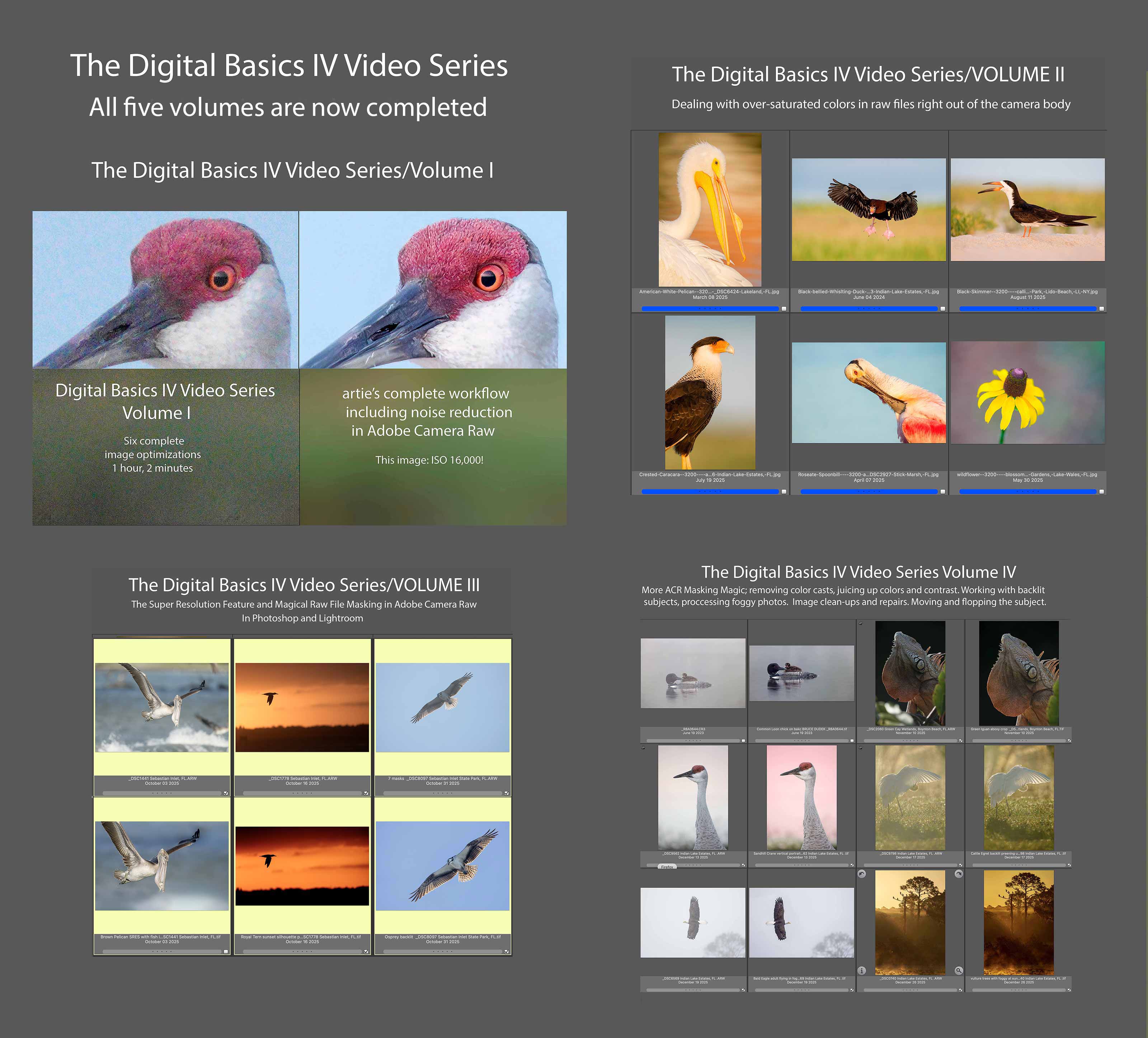
Click to enlarge. The Digital Basics IV Video Series by Arthur Morris/BIRDS AS ARTYou can save $50.00 by purchasing the entire 5-Volume Series by clicking here. |
Digital Basics IV Video Series: $146.00 for all five videos/save $50.00
I have some fabulous new image optimization tips, techniques, and tricks to share. As the Digital Basics III Video Series proved to be so popular, I decided last fall to run it back in the form of Digital Basics IV. Digital Basics V is on the horizon.
My new workflow includes the use of the masking feature in Adobe Camera Raw (thanks to Anita North), the use of the Point Color eye dropper to tame super-saturated colors during raw conversions (discovered in tandem with Anita), a fabulous new Remove Tool trick that makes my favorite Photoshop Tool even more powerful than before -— that one discovered by me. In addition, I have recently begun doing some Curves work during my ACR raw conversions.
My basic workflow remains much the same as is detailed in both the Digital Basics II PDF and in the Digital Basics III Video Series:
1- Setting the Color Temperature (when and if needed).
2- Setting the White and Black Points and adjusting the Highlights and Shadows sliders.
3- Setting the Clarity and Dehaze sliders.
4- Fine-tuning color using the Hue/Saturation/Luminance Targeted Adjustment Tool, a huge step up from the Color Mixer Tool.
5- My 2-step noise reduction technique (with most images).
Once I have the .TIF file in Photoshop, I use my usual cadre of clean-up tools and techniques including the Remove Tool, the Clone Stamp (only rarely), Divide and Conquer, Quick Masking, Layer Masking, Gaussian Blurs, an expanded array of personalized keyboard shortcuts, and tons of other image optimization strategies and methods adapted from previous versions of Digital Basics. I also demonstrate the selective use of Topaz Sharpen AI utilizing the masking feature. And last but not least, I share my JPEG creation methodology.
The Digital Basics IV Video Series is now complete. If you have previously purchased the DB IV Video Series, you should have received Volume V on Tuesday. If not, please contact Jim Litzenberg via e-mail.
Typos
With all blog posts, feel free to e-mail or to leave a comment regarding any typos or errors.
.









Leave a Reply